AI Governance is plumbing
Five controls that take you from agent sprawl to one owned agent, in about 12 weeks.
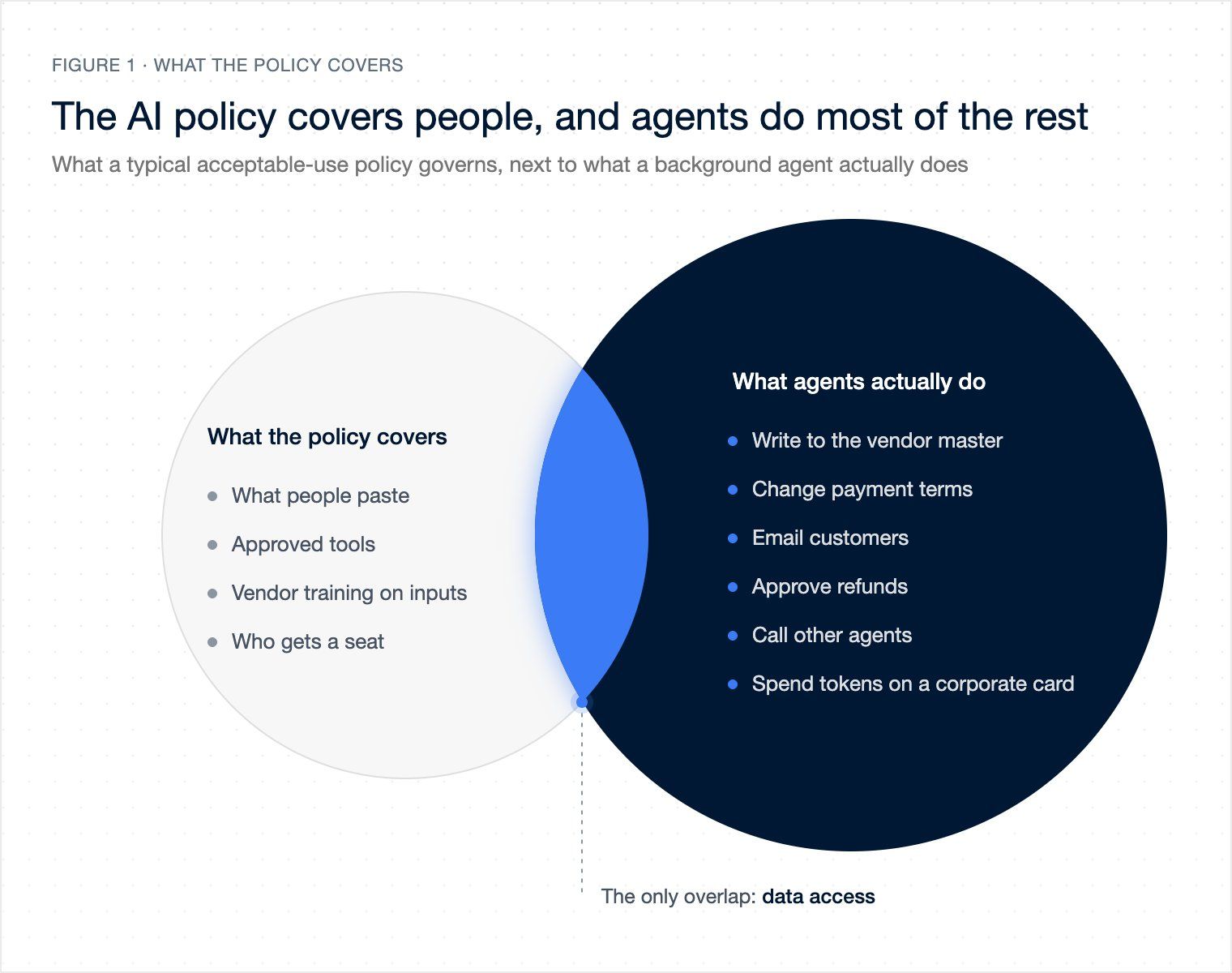
You probably landed here because you're the CIO, CTO, or the person on your team who was tasked with drafting an AI policy. Congrats! Your team has probably already set up some AI governance in your company, which typically looks like a combination of acceptable-use policy, a list of approved tools, and a line in the handbook that says "employees must not paste confidential or customer data into public AI tools." While this works for people using AI tools, it doesn't say anything about an agent that automatically updates thousands of vendor records at 2am while everyone's asleep.
In this piece, I want to walk you through how you should think about AI governance when AI agents start acting on behalf of your teams, the 5 AI governance controls you'll need in that world, the order you should implement them (over the next 90 days or so), and why implementing these controls will help you adopt MORE AI agents than your competitors.
What companies typically have today
As mentioned above, most companies have a policy PDF (the 6-12 page document that was updated when ChatGPT Enterprise or Copilot launched), an AI Council (members from Legal, IT, Security, HR, and a few business units that meet to discuss AI governance), a list of approved AI tools that your employees can use, and a vendor security review (a review that new AI tools need to go through before they're approved for use) in place.
If you asked these companies for a list of AI agents that are running in their company, who owns those agents, and what systems those agents can write to, most would probably say "we'll get back to you".
This is because most of the work that's been done to date to govern AI has focused on sidekick AI tools (Claude, ChatGPT, Copilot, etc.) that people prompt. Governance for these tools is all about preventing the leakage of company data into those tools. That's very different from background agents that will run in your systems of record, prompting your teams only for exceptions and judgement calls. Governance for those agents is all about the actions those agents can and can't take on your teams' behalf. Most of the work that's been done to govern AI in large companies to date has focused on sidekicks, but now needs to focus on background agents.
For context, Varick works with extremely large companies (with $1B+ in revenue, 1k to 100k employees), helping them adopt AI, from general strategy, to process re-engineering, to building, deploying, and managing their agents.
We've seen a pattern with the companies we've worked with: someone in the accounts payable team builds an agent using their personal API key, running as their company’s service account in their ERP, and shares it around. Our agents never do more than the person they act for. It's really useful, and within a quarter, 5 other teams in the company have built agents to do similar work, each running on their own API keys, and using different prompts. Then, 6 months later, when it comes time for an audit, no one can tell you which agents acted on the company's behalf, if any of their actions were approved, or which prompts were used by those agents. And when the team looks at their token spend, they can't tell you who’s responsible for that spend, since it came from a variety of cost centers and corporate credit cards. This is agent sprawl, and it's a huge problem.
 Tap to enlarge (opens the full-size image)
What is AI Governance
AI Governance is about being clear on who you are acting as, what you can access, how decisions are made about what actions are approved, and what is logged. Once an agent starts to take actions, all of these things become engineering and are controlled via your identity provider, permission model, workflow design, and logs. It's important to acknowledge that the policy of an organization describes the controls that exist as a result of engineering. Here are the 5 key controls I'd expect to be in place before an agent can perform any actions that write to a system:
⑴ Agents must act as an account which is provisioned by the company. No personal API keys or admin accounts. Access must initially be read only and only be increased to agreed scope once in production. All access must be revocable by the company at any point in time.
⑵ Read access must be separate from write access. There are actually 3 steps here: read, propose, and update. Each step requires permission which has been approved by an admin who can revoke it at any time. This must be checked each time an agent wants to perform an action, not just at the start of the agent run.
⑶ There must be an owner for each type of action that an agent can perform. The workflow should clearly state where the agent is allowed to make a decision vs a named individual. Expect the agents to be performing 90% of the work and humans 10%. It is critical to identify what that 10% is and name the people that will make those decisions before you even start to build the agent. Don't assign this to a team; it has to be a person (for example, John Smith, the AP manager, can approve changes to bank account details for a vendor or a new vendor if the value is above $25k).
⑷ All agents must be registered in a central registry, which should include information like what the purpose of the agent is, who the owner is, who will use it, what systems it accesses, and what version it is.
⑸ All actions must be logged in an append-only, tamper-evident log. This includes actions that the agent wanted to take but were not allowed. It's really useful to see things that were denied, as it helps you validate that the process map that you think is being followed is actually what the agent is trying to do. By design, we have a “no log, no action” policy, where no actions are dispatched unless the audit storage is up and running.
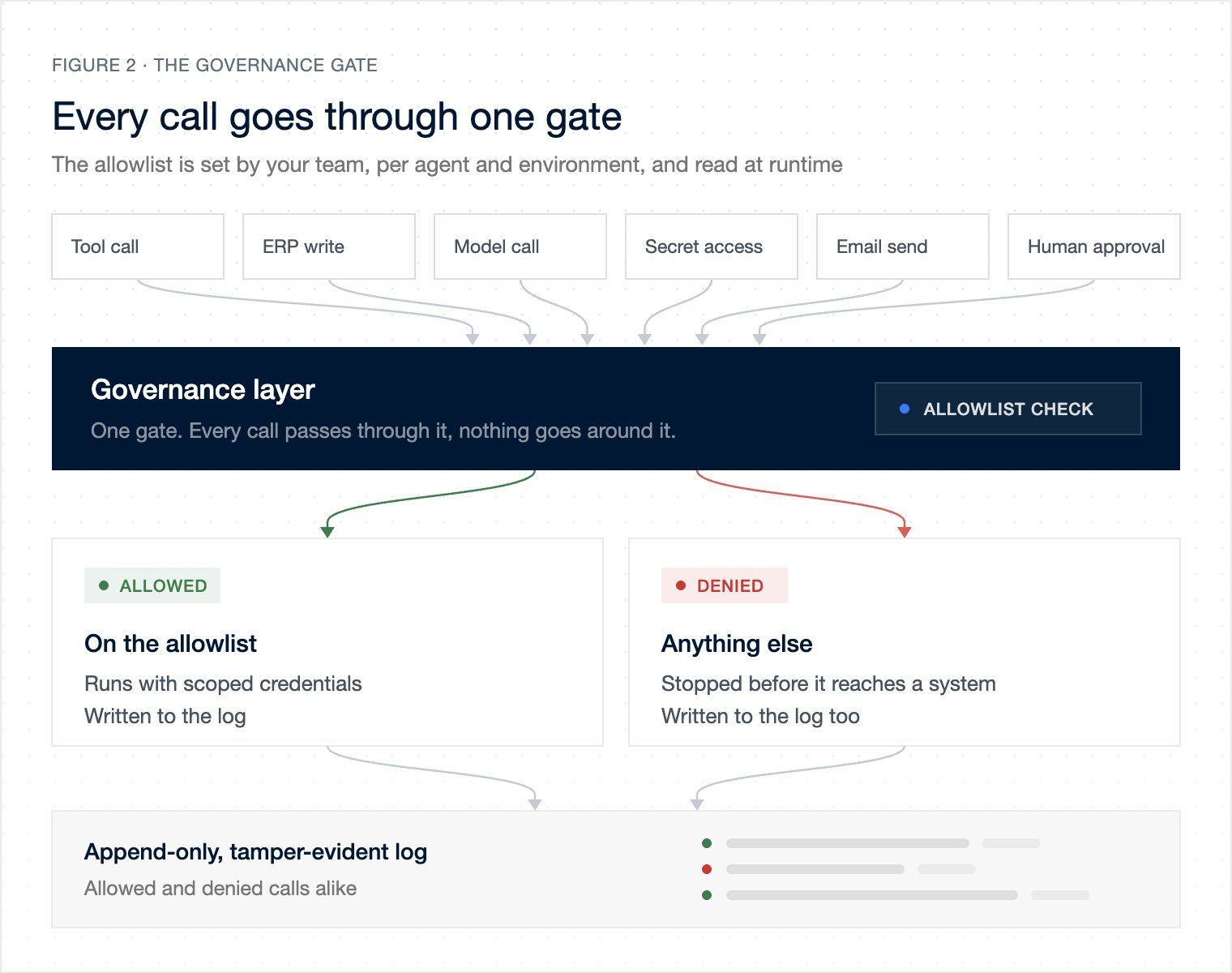
All of the calls that the agent makes (tool calls, calls to ERP, calls to AI models, reading secrets, sending emails) will go through a common place. When a call is made, it checks an allowlist of things that the agent is allowed to do, which is defined by your team, for that agent, in that environment. The allowlist is read at runtime, so if it's changed the next action the agent tries will fail if it's no longer allowed. If the action is allowed, it'll provide it with scoped access to make that call and log what it did. If the action is not allowed, it will prevent the agent from making that call and log what it tried to do. This pattern allows the Risk and IT teams to be comfortable that their controls are being followed.
 Tap to enlarge (opens the full-size image)
How do you set this up?
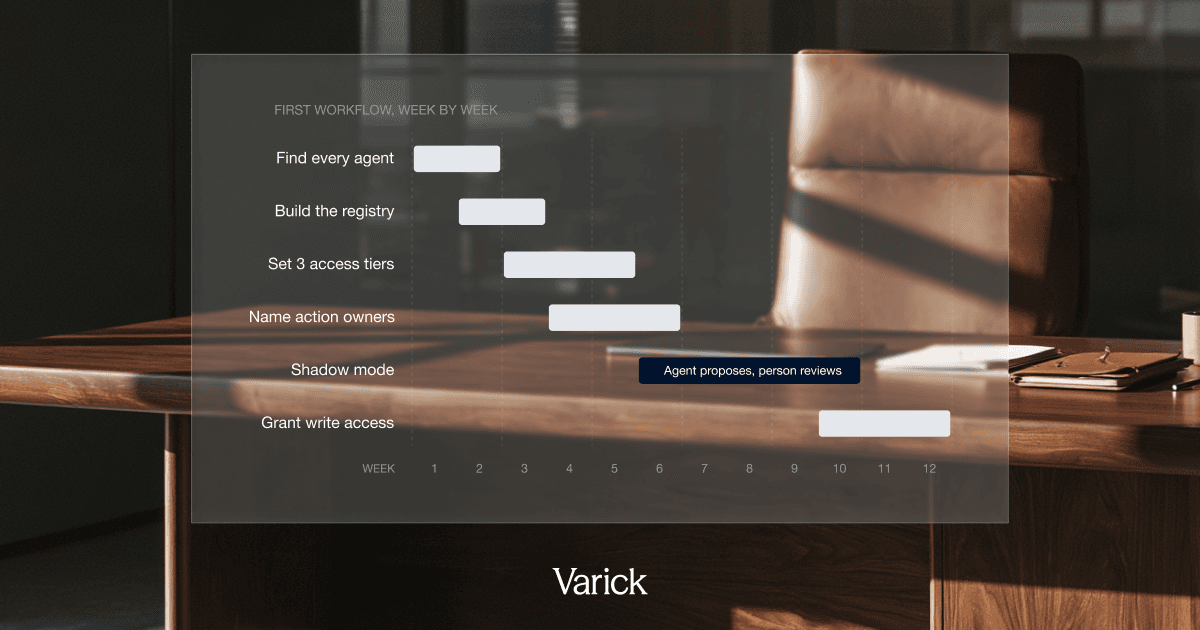
This'll take some time to set up, taking roughly 60-90 days to get the first function going. Here's the order of steps:
⑴ Weeks 1-2: Find all of your agents, including the ones that haven't been approved yet. A great place to start is the admin console for your model provider, which should have a list of API keys. You can also look for all service accounts with names that include AI, bot, or GPT, and look for expenses with providers like OpenAI or Anthropic. I can guarantee you that there'll be more than you think (usually a lot more!).
⑵ Weeks 2-3: Add all agents to the registry, with an owner. If an agent doesn't have an owner who is willing to take ownership of it, turn it off.
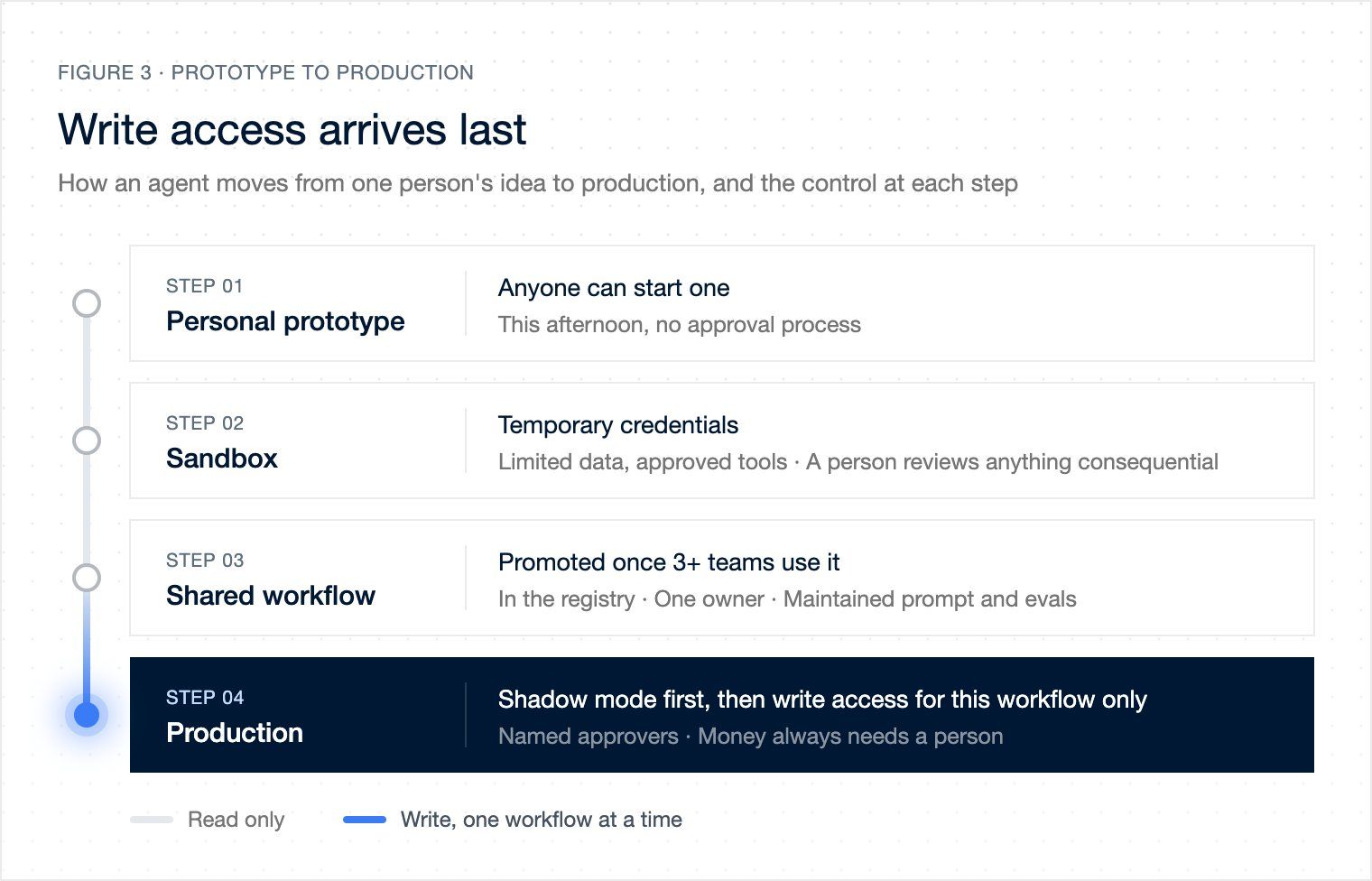
⑶ Weeks 3-5: Create the 3 access tiers: sandbox, shared workflow and production. Make a note of what access each will have. For example, sandboxes should be provisioned with limited access to specific credentials/data/tools, and a person who will review actions.
⑷ Weeks 4-6: Select the first workflow that you want to bring into production and name all of the action types, and a person for each.
⑸ Weeks 6-10: Run the agent in shadow mode. This means it can work on a real queue of items but it doesn't have access to write to systems of record. The actions it wants to take will be recorded and reviewed by a person. The log of actions will tell you where the agent chose something different to the person.
⑹ Weeks 10-12: Once you've got sign off from Risk and IT, you can request that the agent is allowed to write to the system of record for that workflow. Use the shadow mode log to show what you've been doing. Get the sign off in writing, with names. When you bring the next workflow on board, the agents will start with no write access. Workflows which involve moving money will always require human approval, simply because the volume of work saved by automating it won't offset the value of the one time you get it wrong.
⑺ Monthly after: Owners should be reviewing the agent's actions, figuring out which were denied, where the behavior differed from employees, and how much each agent costs in tokens. This is also where spend can be controlled - each agent call should have a clear budget that is reserved beforehand, with calls that exceed the budget being denied. Furthermore, agents that aren't being used should simply be retired.
 Tap to enlarge (opens the full-size image)
Walking through an example
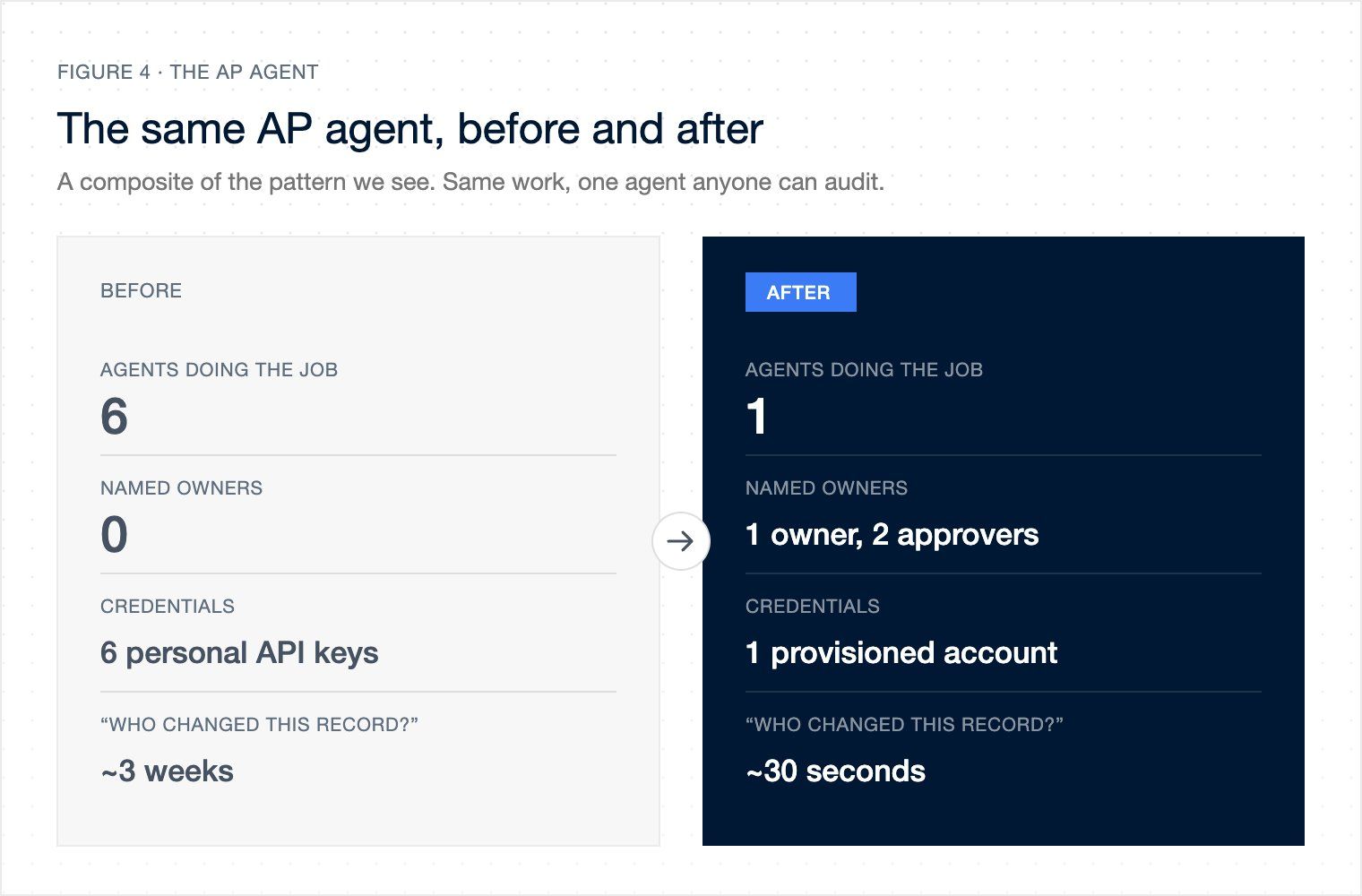
Using the same example as above, you’d want to create an agent to perform the task, but it starts in a sandbox with temp credentials, and only a copy of last quarter’s exceptions. Once 3 different people/orgs want to run the same agent, you start to think about building a proper workflow: a single agent, a single prompt that someone’s responsible for maintaining, and a single person who owns the process (AP manager). You then run the agent on the 'real' exceptions in shadow mode, and see where the log of its actions differ from the real AP team. After a few weeks of shadow mode, you grant the agent access to write to the vendor master, but only for that workflow, and only to send changes to bank details and payment terms (for high value vendors - $25k) to the AP manager for approval.
There was once a set of 6 agents, but now there is 1. There was previously nobody responsible, but now there is an owner and a set of approvers (2). There was a set of API keys (some on personal cards), but now there is a corporate account that can be turned off. There was a 3-week investigation into how something got changed, but now it takes minutes to run a search in the log to see what the agent did, which version, what rules allowed it, and who approved it.
 Tap to enlarge (opens the full-size image)
Why no one does this
This is rarely seen because the ‘council’ approach is quite comfortable, as no one actually has to own anything. Most people just sit there with a bunch of other people writing policies all day. But the tricky bit is that the 'Agent layer' doesn’t belong to any single function in your company - you may have an identity provider (IT), a vendor (security), an ERP (finance), and someone to build agents, but the plumbing to bring them all together doesn't belong to any of those, so no one’s built it.
The other issue is that most of the point solutions you use have their own way of governing them - so if you use a bunch of AI products that come with agents for the BDRs, the accountants, and the IT helpdesk, each of those will have their own dashboard where someone can turn on and off access. The problem is that you may end up with 12 different agents from 12 different vendors, each with their own approach to permissions and logging. It’s just another form of sprawl. And a bunch of large firms are pitching their 'AI governance frameworks' - which is normally a big deck, with a maturity model, a RACI, and a target operating model. These won’t help you answer a simple question from an auditor in less than a few seconds; it'll just lead to a long pause before you have to ask the auditor to hold the line.
Finally, if you get governance right, you can enable more. The key thing is to let the people closer to the business come up with ideas for how to use AI/agents. They'll have way more ideas than some central 'AI' function. Let them build agents. But don't let them build the infrastructure to run the Agents - that has to be shared. And with a shared platform, you can be more permissive in the sandbox.
Work with us
This is what we do at Varick: we build these agents for you, in your cloud, using your systems of record. You provision the accounts the agents use, you check permissions at point of action, you approve who can take which actions, you have a single registry, evals, versioning and append only log (including denied actions). You own it all and can turn it off at any point. Typically we do the inventory & process map for one function and take the first workflow from shadow to production. We work with $1B revenue companies, building agents for Finance, HR, Sales, Procurement, Ops, IT, etc. If you are the person who has to answer the "who changed this" question, visit our website here.
TL;DR
Your AI policy probably covers humans using chatbots, not agents taking autonomous actions.
Agent governance in reality looks like plumbing. Companies need to worry about five things: ⑴ provisioned accounts, ⑵ point-of-action read vs write permissions, ⑶ named owners for action types, ⑷ a single registry, and ⑸ append-only logs including denials.
This will take roughly 60-90 days to get right, as you wrangle your inventory, registry, 3 permission tiers, decision owners, shadow mode, and iterative writes.
The end result is that you're able to limit agent sprawl to 1 owned agent, where answering “who changed this?” takes minutes instead of weeks.
Last updated