Grow Without Headcount

AI and jobs is a complex equation. Let me tell you what I've seen play out at the world's biggest companies.
If you run a department like Finance, Ops, HR, or Sales at a large company, you almost certainly have been given 2 numbers: a growth target for next year, and a headcount plan of how many people you’re allowed to hire. These 2 numbers used to be linked, as more growth meant more invoices to pay, orders to fulfill, people to onboard, and quotes to run through the deal desk. Until now, the only way to do more work was to hire more people.
Furthermore, when the board asks how AI benefits the company through the lens of headcount, the question is always along the lines of “How many people can we lay off?”
What we’ve seen is that the best buyers have recognized that the question they should actually be asking is, “How do we keep growing our business without increasing headcount?”
This difference in framing leads to very different workflows, ROI models, and business outcomes. Below, we test both scenarios with the same 40-person AP team as case studies to showcase how you can select workflows, demonstrate ROI, and break the zero-sum mindset.
The cut scenario
Let’s suppose an Accounts Payable department has 40 people, handles 30,000 invoices per month, and expects to grow 20% per year for the next 3 years.
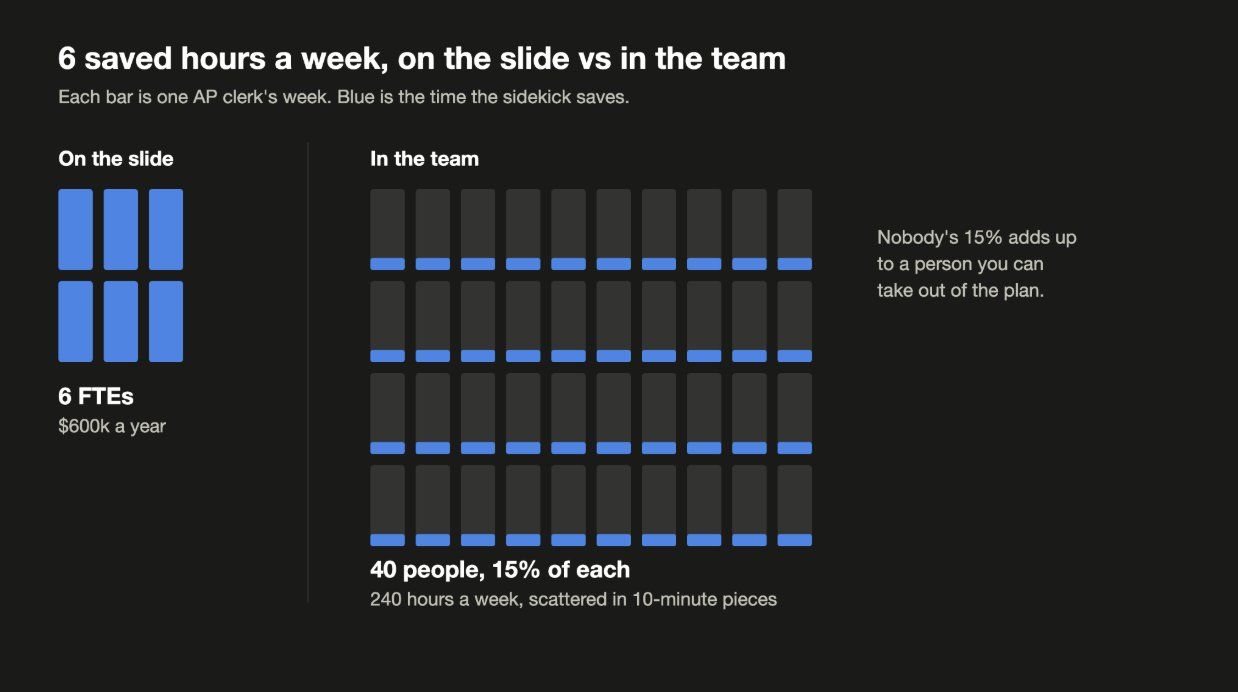
If you’re trying to save headcount, you go hunting for the workflow that has the most people in it and start counting their hours. Thus, you adopt an AI copilot from a vendor that sits next to each person in AP and promises to improve their productivity by 10-20%, saving each of them around 6 hours per week. That’s a total of 240 hours per week, which in the business case translates to 6 people (or around $600K per year, if the fully-loaded cost of each AP person is $100K).
Unfortunately, those 6 hours are saved in the form of 10-minute chunks scattered throughout the week. Since the nature of the workflow doesn’t change, the saved time ends up getting reabsorbed straight back into the process via the exception queue, vendor emails, and the 3rd or 4th review. In the end, the productivity increase doesn’t actually translate into any headcount reduction. Fast forward a year and you’ll need to hire more AP people to handle the increasing volume of invoices, and alongside that pay for the software licenses they need to do their job. Net net, your AP budget ends up being even higher than before despite “AI adoption”.
Additionally, the cut mindset is detrimental to any further AI projects on your roadmap. In order to take the next step of building agents, you need the tacit knowledge of your employees. They are the ones who know the vendors that are always late, the client who needs a custom invoice format, and the exception that happens once a quarter which costs the company $200K when someone misses it - but they are also the ones whose jobs are at risk. If you try to capture their entire job into an agent with their salary as the ROI, what incentive do they have to tell you about the exceptions to build a system that handles everything?
 Tap to enlarge (opens the full-size image)
For context, @varickagents works with large companies (between $1B-$100B in revenue, 1k-100k employees), helping them with all things AI: from general strategy, to process re-engineering, to building, deploying, and managing their agents.
The grow scenario
Going back to our AP team, let’s look at a second scenario.
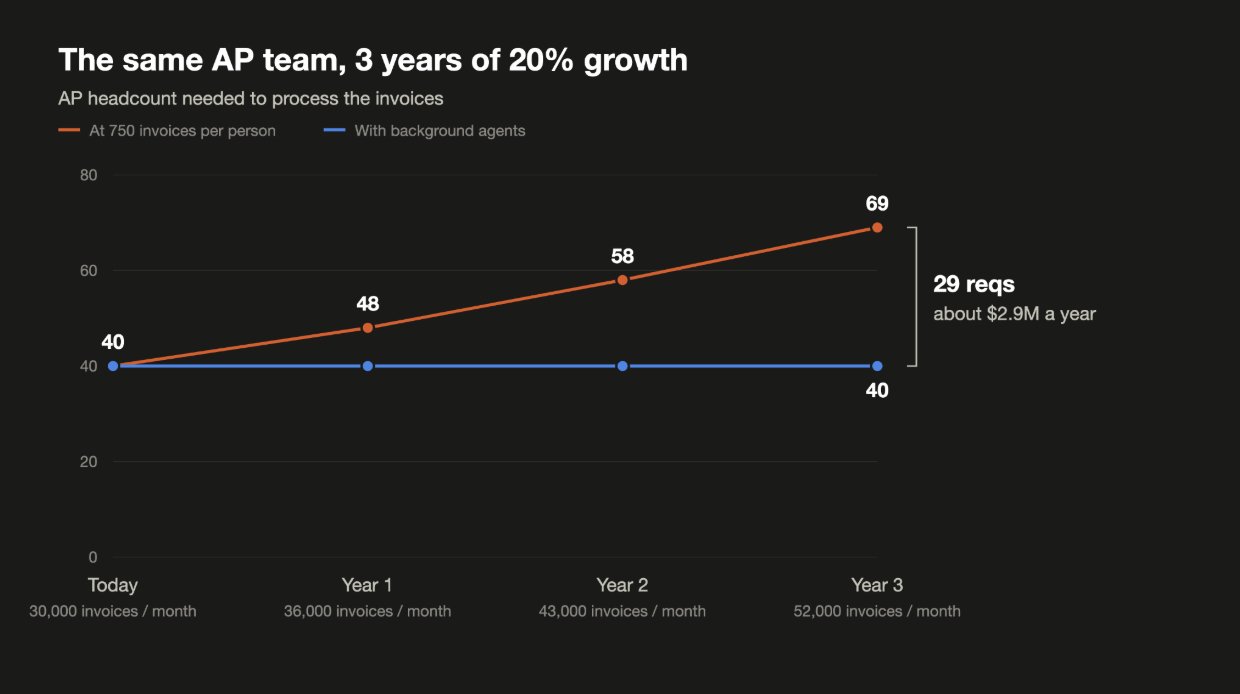
If the company grows 20% YoY, it’s going to receive 36,000 invoices next year, 43,000 the year after, and 52,000 in 3 years. Assuming your AP team processes about 750 invoices per person per month, you’re going to need 48 people next year, 58 the following year, and 69 in 3 years.
That means there’s 29 hires sitting in the headcount plan, who will tack on a bill of $2.9M per year at the end of all 3 years. This is also excluding the implicit costs of expanding headcount (e.g. the recruiters that find them, the additional managers you’ll need to hire, and the time it takes to train them and teach them all the exceptions).
You cannot enable your team of 40 to process 52,000 invoices a month with a copilot. Even assuming your team will all use a copilot well (which most won't), you'll see 10-20% efficiency gains - getting you to a best case scenario of 33-36k invoices/month, covering just the first year. In order to hit 52k invoices/month, you'll need to have most invoices processed without any involvement from your clerks. This means that you need agents that work in the background to match, code, and route inside your ERP, only presenting the exceptions and human judgement calls to your team. This type of workflow is where we’ve seen 60-90% efficiency gains, with AP exceptions going from 600-800 per month down to under 50.
Once you’ve transformed your AP team, agents will be able to process a majority of invoices every month while your team can spend time on the highest value-add exceptions, like dealing with the vendor who’s chronically late instead of 3-way matching. Now, your AP team processes 52,000 a month - and no one had to be fired to meet this new volume, which is how you know your AP clerks will actually sit down and help you out with the AI project.
 Tap to enlarge (opens the full-size image)
Start with the hiring plan
When thinking through the framework of the cut scenario, you pick workflows by what your team does today. Conversely, the grow scenario picks workflows by where your NEXT hires are going. Thankfully you already have that list: it’s your headcount plan. Each open requisition is a pointer to a workflow where your team is constrained and can’t handle the additional volume.
- Pull the list of open reqs, along with next year's approved headcount plan. Then, group each req by department (making sure to include the contractors, temps, BPOs, and overtime lines). Volume growth shows up 2-3 quarters before it becomes a req.
- For each open req, what is the volume that they will be handling? Is it invoices? New hires to onboard? Non-standard quotes for deal desk? Claims? Tickets? Month-end journal entries? Etc. If it's not volume based (such as someone to handle a new market or product), they’re a real hire that can be removed from the list.
- Work through the workflow for each of these items, noting the current processes and all the systems they touch. Most of your process documents will not match what your team is actually doing and there will likely be a lot of variation from the documented process (often 40%+ of the volume). You'll need to reconstruct these motions from the systems of record and those actually doing the work.
- Note the current metrics for each workflow (volume per person, cycle time, cost per transaction, and error rate) before anything gets built. Without it, you'll be arguing about ROI from memory when analyzing the productivity of AI.
- Re-engineer each of the workflows before you automate anything. What you'll usually find is that the current 15 step workflow can be re-engineered down to about 5 steps, 4 of which can be handled by agents. If something can be handled by plain old code, that should be the default.
- Finally, take inventory of your current systems (NetSuite, SAP, Salesforce, Workday, ServiceNow, etc.), and ship agents on top of them that run in parallel alongside your actual volume, until both results are the same.
This same process can be used for each department. In Sales, the reqs will likely be for deal desk analysts, because it takes 4 days to get quotes approved. The volume will be the number of non-standard quotes. In HR, it will likely be onboarding coordinators, with the volume being new hires. The hiring plan will be the same kind of document in every department.
What goes in the ROI model
One of the most common questions that we've been asked is: when thinking about ROI, do we just mean headcount? While headcount is a piece, there are 3 additional types of ROI we like to think about when adopting agents: cost savings, revenue growth, and risk reduction. Under the growth framework, there's a metric for each one that can be checked by the Finance team to demonstrate a successful AI transformation.
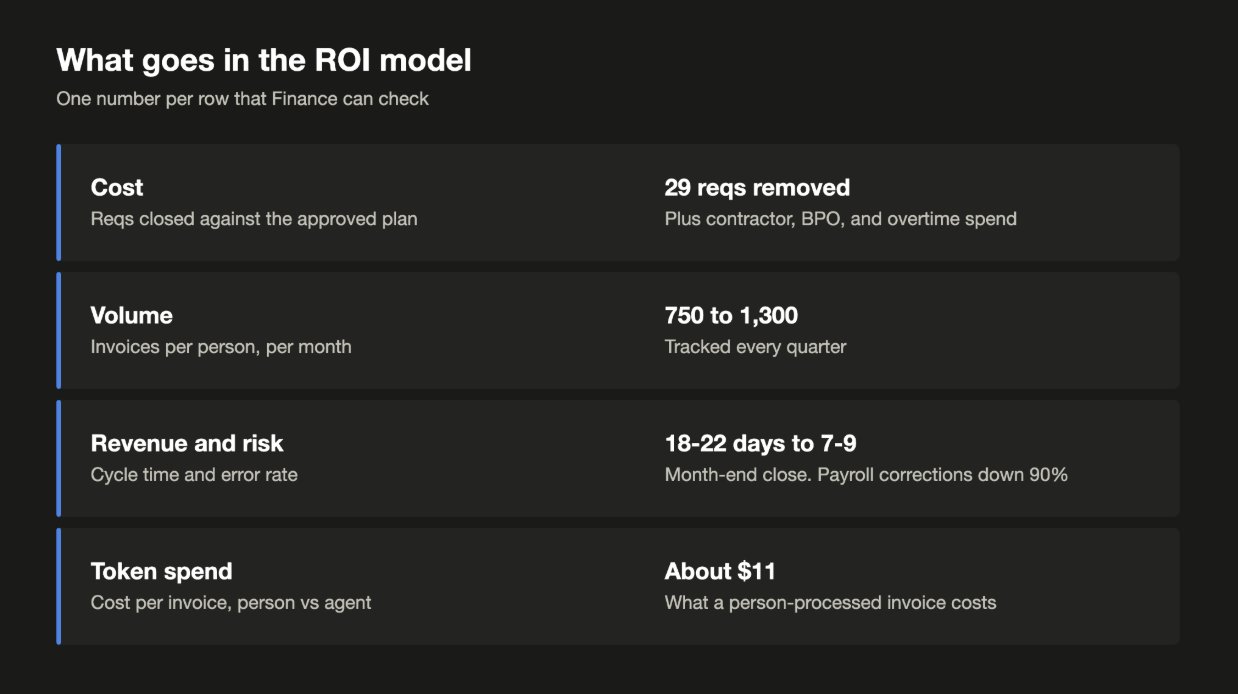
Cost is the first bucket - “how many reqs did we close that were part of the approved headcount plan?” While cost avoidance can have a negative connotation amongst CFOs, because it's typically predicated on made up numbers by vendors, this case is unique as the reqs were part of a headcount plan previously approved by the CFO. It's important to make sure that the cost bucket is inclusive of all types of spend, such as contractors, BPO, and overtime. Another adjacent metric to look at is volume per person. For AP that may be invoices per person, for the deal desk quotes per analyst, and for onboarding new hires per onboarding coordinator. If AI is successfully adopted, volume per person should expand over time while headcount stays flat.
Revenue is an often overlooked bucket, which comes from reducing the cycle time of a revenue-generating activity. If a deal team is volume-constrained, then being able to quote a deal in 4 hours vs. 4 days can unlock additional deals per quarter that would have slipped to the following quarter. The question to ask here is: how many bookings were closed faster because of this agent?
Risk is double-faceted - in addition to reducing error rates, agents can also help teams catch errors faster. We've seen agents reduce payroll corrections by 90%, with month-end closes coming down to 7-9 days instead of 18-22. Here, ROI comes from money saved because of eliminated errors, which could include rework hours, penalties, writeoffs, and late adjustments.
Ultimately, all of these sources of ROI are gated by token spend. For an AI project to make sense, it needs to be cheaper per outcome than adding another person. In our scenario it costs about $11 per invoice to process, assuming a 40 person team that costs $4M per year processing 360k invoices per year. The cost per invoice with the agent needs to be strictly lower than that number, inclusive of all implicit costs (e.g. if the agent is flagging invoices for humans to review, the human’s time needs to be accounted for in the price).
One reason why AI efforts fail to show ROI is because invoices are routed through frontier models, with the entire history of every vendor being reread for each request. Agentic workflows should win on price when they're set up properly, which typically looks like a cheaper model for routine extraction/matching and then routing exceptions to humans.
 Tap to enlarge (opens the full-size image)
What happens to the team
Initially, the agents handle the repeatable work and route the exceptions that need real judgment to the humans. Over time, fewer items will need a human as agents learn from the team’s corrections. But there will always be edge cases that need a human in the loop.
There are no cuts, but the job still changes for everyone. Business growth without headcount growth requires organizational rework, but it’s much easier to convince people to embrace this paradigm shift and get them the training they need if they know their jobs aren’t up for cuts. If you’re the manager of someone who’s been manually keying invoices for 10 years, and you need them to shift roles to review and correct the output of agents, that communication must happen before the system gets rolled out.
Why this is rare
There are a couple reasons why truly effective AI transformations aren’t everywhere.
Firstly, the cut mindset is much easier to wrap your head around: multiplying the number of FTEs by their loaded cost, you reach a business case the board can follow in 10 seconds. If you go to a run-of-the-mill consulting firm, this is what they’ll have in their deck after months of research.
On the other hand, point solution vendors are going to sell you AI like a person. Unfortunately, an “AI Accountant” or an “AI BDR” with a price tag similar to a person won’t get you where you need to go, because it’s limited by the same constraints a person is: time, context, and bandwidth. Invoices can’t be handled by just an “AI Accountant”, they span Procurement, Accounts Payable, Treasury, and the General Ledger. This means that increased volume will always require more people, unless context is shared between all functions. Other vendors selling copilot type solutions will sell you on adoption, measured by how many people logged in this month, but as you can see adoption is a terrible measure for whether or not you need to hire next year.
Finally, unopened reqs typically don’t have an owner - nobody gets promoted for the 29 people not hired, so nobody ends up tracking it. It’s critical that someone (e.g. the CFO) owns the headcount plan and measures against it as a baseline, so that the company can prove it’s growing without adding headcount, and that the AI transformation is indeed working.
Ready to take the leap and ship your own agents? This is exactly what we do at Varick. We work with companies doing over $1B in revenue, across finance, sales, procurement, operations, HR, and more. 100% of our clients have gone to production and 100% are now working on project #2. Check us out at varickagents.com.
And if you want more content like this, subscribe to our newsletter at varickagents.com/newsletter.
TLDR
There are 2 questions you can ask about AI. The cut question is “How many people can we take out?” If you ask it, you’ll end up measuring AI against hours saved - and if you save 40 clerks 6 hours a week, that's $600K that only exists on paper. The grow question is “How do we keep growing our business without increasing headcount?” If you ask it, you’ll end up looking at the 29 people you are supposed to hire over the next 3 years.
Pick workflows from your hiring plan. Every open req, contractor line, and overtime line points at a workflow where volume is outrunning the team. Map out these workflows, get a baseline, then re-engineer them (if it takes 15 steps, can you get it to 5?), and build agents on top of your existing systems.
Copilot (“Sidekick”) agents save 10-20% of the time, which is good for about a year if you’re planning on 20% growth and everyone uses them. “Background” agents are how you go from 30K invoices/month to 52K invoices/month with a team of 40 people.
Measure your success against reqs you closed from your approved plan (and actually remove them), volume/person, cycle time, error rate, and cost/transaction (in the example, it costs about $11 for a person to do an invoice).
Work with the people who know the exceptions to the rules - their jobs aren’t the business case, so they’ll help you.
Last updated